> ## Documentation Index
> Fetch the complete documentation index at: https://docs-dev-ia-user-profiles.mintlify.site/llms.txt
> Use this file to discover all available pages before exploring further.

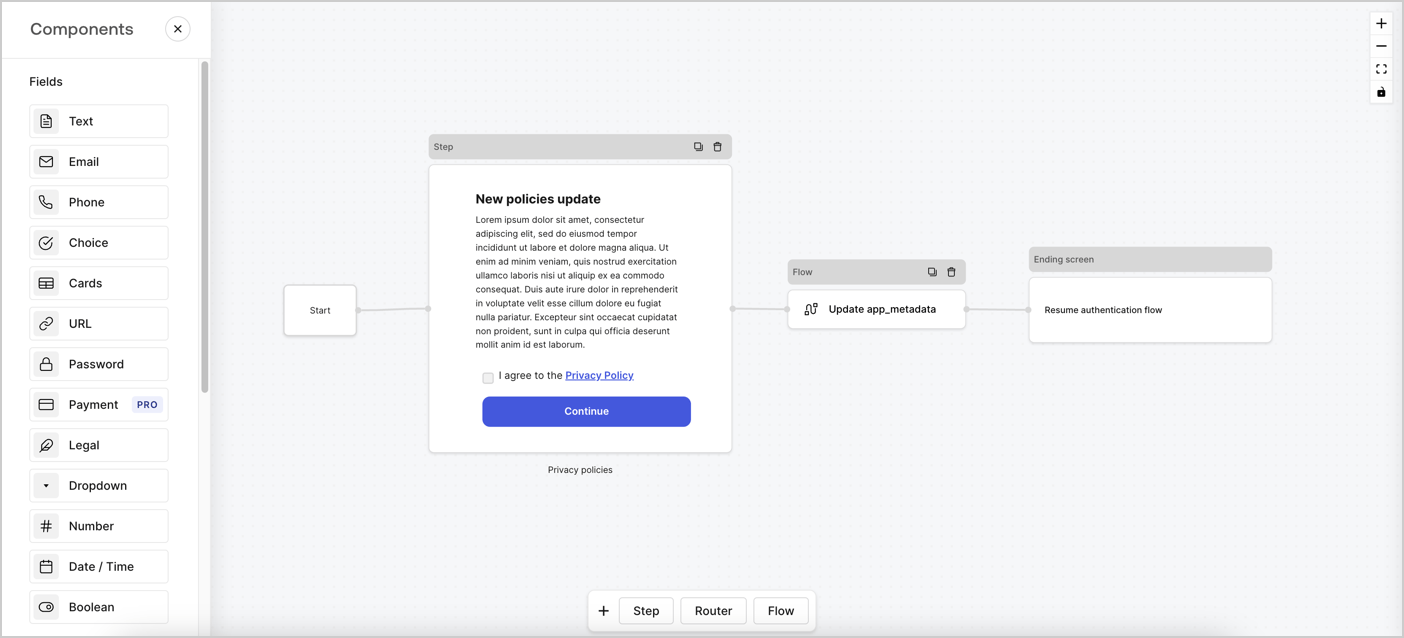
> Learn how to configure an update policy form using Forms for Actions for users to review and accept new terms of service or consent updates.

# Use Cases: Configure an update policy form using Forms

<Card title="Before you start">
  1. Create a [Machine-to-Machine Application](/docs/get-started/auth0-overview/create-applications/machine-to-machine-apps) with the following scopes enabled:

  * `read:users`
  * `update:users`
  * `create:users`
  * `read:users_app_metadata`
  * `update:users_app_metadata`
  * `create:users_app_metadata`

  2. Add a [Vault connection](/docs/customize/forms/vault) using the M2M application credentials.
</Card>

Forms for Actions allows you to create custom privacy policies flows and store the consent under the `app_metadata` object.
<Frame>
  <img src="https://mintcdn.com/docs-dev-ia-user-profiles/XCPLNud4-wCwKwH9/docs/images/cdy7uua7fh8z/6i68dMvHDTijfRmSgN1x8Q/ad900e7d4c0fb34645921435472b8684/privavy-policy-form.png?fit=max&auto=format&n=XCPLNud4-wCwKwH9&q=85&s=e40764db4e551ac8770ff23a48c11a5c" alt="Dashboard > Actions > Forms > Privacy policy use case" data-og-width="1404" width="1404" data-og-height="638" height="638" data-path="docs/images/cdy7uua7fh8z/6i68dMvHDTijfRmSgN1x8Q/ad900e7d4c0fb34645921435472b8684/privavy-policy-form.png" data-optimize="true" data-opv="3" srcset="https://mintcdn.com/docs-dev-ia-user-profiles/XCPLNud4-wCwKwH9/docs/images/cdy7uua7fh8z/6i68dMvHDTijfRmSgN1x8Q/ad900e7d4c0fb34645921435472b8684/privavy-policy-form.png?w=280&fit=max&auto=format&n=XCPLNud4-wCwKwH9&q=85&s=c902d04194afb5e4bae50443bfb28049 280w, https://mintcdn.com/docs-dev-ia-user-profiles/XCPLNud4-wCwKwH9/docs/images/cdy7uua7fh8z/6i68dMvHDTijfRmSgN1x8Q/ad900e7d4c0fb34645921435472b8684/privavy-policy-form.png?w=560&fit=max&auto=format&n=XCPLNud4-wCwKwH9&q=85&s=4d6cf8a3fbcb9baa624f5d88418ff4ed 560w, https://mintcdn.com/docs-dev-ia-user-profiles/XCPLNud4-wCwKwH9/docs/images/cdy7uua7fh8z/6i68dMvHDTijfRmSgN1x8Q/ad900e7d4c0fb34645921435472b8684/privavy-policy-form.png?w=840&fit=max&auto=format&n=XCPLNud4-wCwKwH9&q=85&s=49f05becc13253b26a2ffc2a6681c07d 840w, https://mintcdn.com/docs-dev-ia-user-profiles/XCPLNud4-wCwKwH9/docs/images/cdy7uua7fh8z/6i68dMvHDTijfRmSgN1x8Q/ad900e7d4c0fb34645921435472b8684/privavy-policy-form.png?w=1100&fit=max&auto=format&n=XCPLNud4-wCwKwH9&q=85&s=5de91aab35f69da14988933124ad0f91 1100w, https://mintcdn.com/docs-dev-ia-user-profiles/XCPLNud4-wCwKwH9/docs/images/cdy7uua7fh8z/6i68dMvHDTijfRmSgN1x8Q/ad900e7d4c0fb34645921435472b8684/privavy-policy-form.png?w=1650&fit=max&auto=format&n=XCPLNud4-wCwKwH9&q=85&s=ddbcebfc042237f3e7daa765eb7297e3 1650w, https://mintcdn.com/docs-dev-ia-user-profiles/XCPLNud4-wCwKwH9/docs/images/cdy7uua7fh8z/6i68dMvHDTijfRmSgN1x8Q/ad900e7d4c0fb34645921435472b8684/privavy-policy-form.png?w=2500&fit=max&auto=format&n=XCPLNud4-wCwKwH9&q=85&s=28e3c940c2428bb98a4e9c2fe5aa1b5f 2500w" />
</Frame>

The sections below outline how you can create an Update Policy form using nodes and flows, along with steps for adding your form to a [Post Login](/docs/customize/actions/explore-triggers/signup-and-login-triggers/login-trigger) Action.

## Create a form from scratch

Follow these steps to create a form to gather information:

1. Open the Form editor by selecting **Auth0 Dashboard > Actions > Forms.**
2. Select **Create Form** > **Start from scratch**.

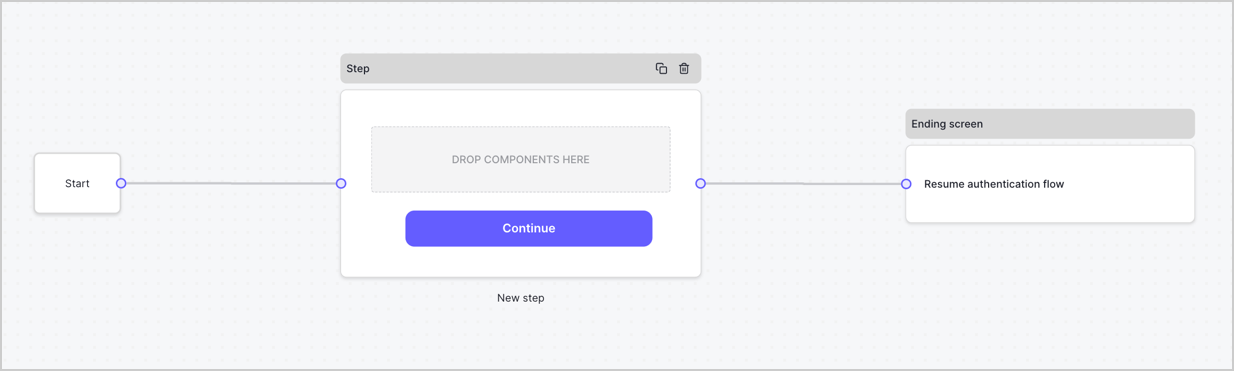
By default, a new form contains a Start node, a Step node, and an Ending screen node.
<Frame>
  <img src="https://mintcdn.com/docs-dev-ia-user-profiles/QSihrG3kbBq5q3Q5/docs/images/cdy7uua7fh8z/2TZ9jSjgEcARFpULI6hz4R/a4319a1bd482f2ee5cc23100fdb2f42c/New-form-Forms-for-action-use-case.png?fit=max&auto=format&n=QSihrG3kbBq5q3Q5&q=85&s=acd45364cbc6a1cc9ff8602f19c74815" alt="Dashboard > Forms > Use Cases > Form" data-og-width="1234" width="1234" data-og-height="371" height="371" data-path="docs/images/cdy7uua7fh8z/2TZ9jSjgEcARFpULI6hz4R/a4319a1bd482f2ee5cc23100fdb2f42c/New-form-Forms-for-action-use-case.png" data-optimize="true" data-opv="3" srcset="https://mintcdn.com/docs-dev-ia-user-profiles/QSihrG3kbBq5q3Q5/docs/images/cdy7uua7fh8z/2TZ9jSjgEcARFpULI6hz4R/a4319a1bd482f2ee5cc23100fdb2f42c/New-form-Forms-for-action-use-case.png?w=280&fit=max&auto=format&n=QSihrG3kbBq5q3Q5&q=85&s=4b61a2abb9cf3e4c61efc4d234e39257 280w, https://mintcdn.com/docs-dev-ia-user-profiles/QSihrG3kbBq5q3Q5/docs/images/cdy7uua7fh8z/2TZ9jSjgEcARFpULI6hz4R/a4319a1bd482f2ee5cc23100fdb2f42c/New-form-Forms-for-action-use-case.png?w=560&fit=max&auto=format&n=QSihrG3kbBq5q3Q5&q=85&s=97b52e8f8ead2c87227cb2d42151d9ef 560w, https://mintcdn.com/docs-dev-ia-user-profiles/QSihrG3kbBq5q3Q5/docs/images/cdy7uua7fh8z/2TZ9jSjgEcARFpULI6hz4R/a4319a1bd482f2ee5cc23100fdb2f42c/New-form-Forms-for-action-use-case.png?w=840&fit=max&auto=format&n=QSihrG3kbBq5q3Q5&q=85&s=8a0a53bacb1001fa181a68c723e0cf51 840w, https://mintcdn.com/docs-dev-ia-user-profiles/QSihrG3kbBq5q3Q5/docs/images/cdy7uua7fh8z/2TZ9jSjgEcARFpULI6hz4R/a4319a1bd482f2ee5cc23100fdb2f42c/New-form-Forms-for-action-use-case.png?w=1100&fit=max&auto=format&n=QSihrG3kbBq5q3Q5&q=85&s=5474df7e9b64ee7a6b75807017928e8f 1100w, https://mintcdn.com/docs-dev-ia-user-profiles/QSihrG3kbBq5q3Q5/docs/images/cdy7uua7fh8z/2TZ9jSjgEcARFpULI6hz4R/a4319a1bd482f2ee5cc23100fdb2f42c/New-form-Forms-for-action-use-case.png?w=1650&fit=max&auto=format&n=QSihrG3kbBq5q3Q5&q=85&s=b14ec098a3b18d4044ecbcb08155155c 1650w, https://mintcdn.com/docs-dev-ia-user-profiles/QSihrG3kbBq5q3Q5/docs/images/cdy7uua7fh8z/2TZ9jSjgEcARFpULI6hz4R/a4319a1bd482f2ee5cc23100fdb2f42c/New-form-Forms-for-action-use-case.png?w=2500&fit=max&auto=format&n=QSihrG3kbBq5q3Q5&q=85&s=b01e8b1258575afcbd257b3c006e2482 2500w" />
</Frame>

### Configure the Step node

The Step node is the graphical interface visible to users. Add [Fields](/docs/customize/forms/nodes-and-components) to the Step node to collect the new agreement acceptance value by following these steps:

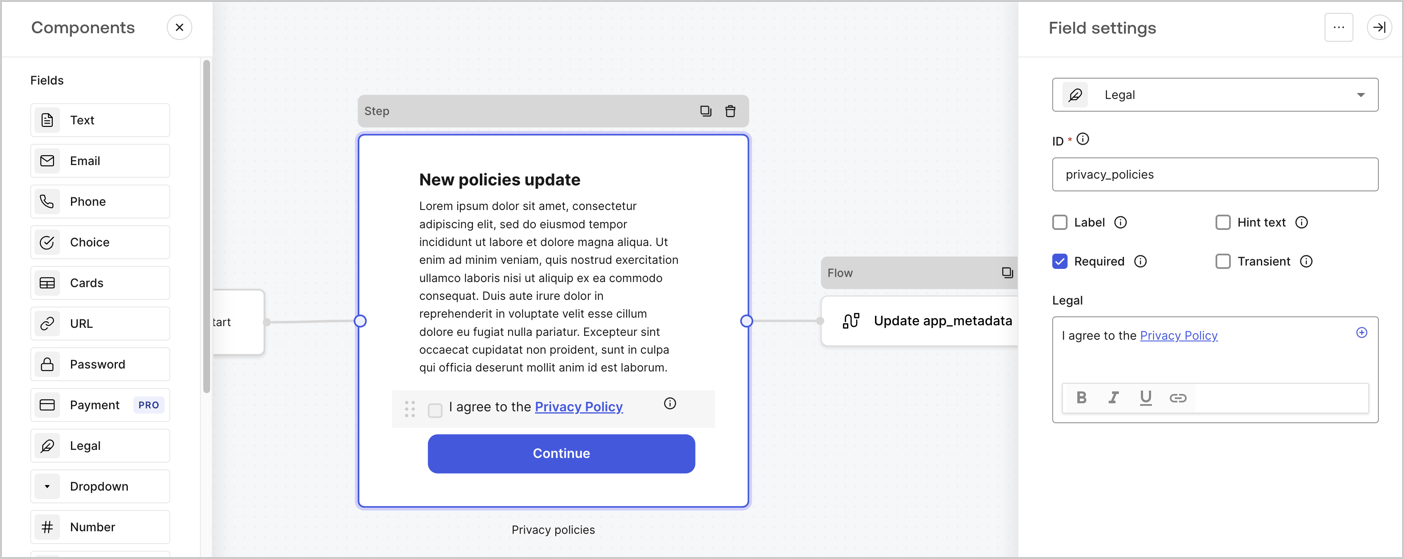
1. Drag a **Rich text** field from the **Components menu** into the **Step** node.

   * **Rich text**: Enter a description of your privacy policies updates.
   * Select **Save**.
2. Drag a **Legal** field into the **Step** node.

   * **ID**: Enter `privacy_policies`.
   * **Required**: Enable the checkbox.
   * **Legal**: Enter `I agree to the Privacy Policy`.
   * Select **Save**.
3. Select **Publish** to save.
<Frame>
  <img src="https://mintcdn.com/docs-dev-ia-user-profiles/a-MWT9nGP2Zobvey/docs/images/cdy7uua7fh8z/59zFFjQjAnjogkc2QGIqqJ/0ad66b1b636544122aa4e65968b76c2c/privacy-policy-step-node.png?fit=max&auto=format&n=a-MWT9nGP2Zobvey&q=85&s=80f9f85e408fc846abfd297ebaaa4926" alt="Dashboard > Actions > Forms > Use case privacy policy step node" data-og-width="1404" width="1404" data-og-height="559" height="559" data-path="docs/images/cdy7uua7fh8z/59zFFjQjAnjogkc2QGIqqJ/0ad66b1b636544122aa4e65968b76c2c/privacy-policy-step-node.png" data-optimize="true" data-opv="3" srcset="https://mintcdn.com/docs-dev-ia-user-profiles/a-MWT9nGP2Zobvey/docs/images/cdy7uua7fh8z/59zFFjQjAnjogkc2QGIqqJ/0ad66b1b636544122aa4e65968b76c2c/privacy-policy-step-node.png?w=280&fit=max&auto=format&n=a-MWT9nGP2Zobvey&q=85&s=2f89c6d335f83d937cf100b3f554cce6 280w, https://mintcdn.com/docs-dev-ia-user-profiles/a-MWT9nGP2Zobvey/docs/images/cdy7uua7fh8z/59zFFjQjAnjogkc2QGIqqJ/0ad66b1b636544122aa4e65968b76c2c/privacy-policy-step-node.png?w=560&fit=max&auto=format&n=a-MWT9nGP2Zobvey&q=85&s=f037e5c54ea08480dca6e75d652af03f 560w, https://mintcdn.com/docs-dev-ia-user-profiles/a-MWT9nGP2Zobvey/docs/images/cdy7uua7fh8z/59zFFjQjAnjogkc2QGIqqJ/0ad66b1b636544122aa4e65968b76c2c/privacy-policy-step-node.png?w=840&fit=max&auto=format&n=a-MWT9nGP2Zobvey&q=85&s=fdce82870beb6de3ef5486f1cfd73c99 840w, https://mintcdn.com/docs-dev-ia-user-profiles/a-MWT9nGP2Zobvey/docs/images/cdy7uua7fh8z/59zFFjQjAnjogkc2QGIqqJ/0ad66b1b636544122aa4e65968b76c2c/privacy-policy-step-node.png?w=1100&fit=max&auto=format&n=a-MWT9nGP2Zobvey&q=85&s=206b7ad76df1e966c533473c11a29fec 1100w, https://mintcdn.com/docs-dev-ia-user-profiles/a-MWT9nGP2Zobvey/docs/images/cdy7uua7fh8z/59zFFjQjAnjogkc2QGIqqJ/0ad66b1b636544122aa4e65968b76c2c/privacy-policy-step-node.png?w=1650&fit=max&auto=format&n=a-MWT9nGP2Zobvey&q=85&s=59c52743eca3961c600d27aa8d3196cc 1650w, https://mintcdn.com/docs-dev-ia-user-profiles/a-MWT9nGP2Zobvey/docs/images/cdy7uua7fh8z/59zFFjQjAnjogkc2QGIqqJ/0ad66b1b636544122aa4e65968b76c2c/privacy-policy-step-node.png?w=2500&fit=max&auto=format&n=a-MWT9nGP2Zobvey&q=85&s=cbb7de40b3692123918dc5c5dbd59057 2500w" />
</Frame>

### Configure the Flow node

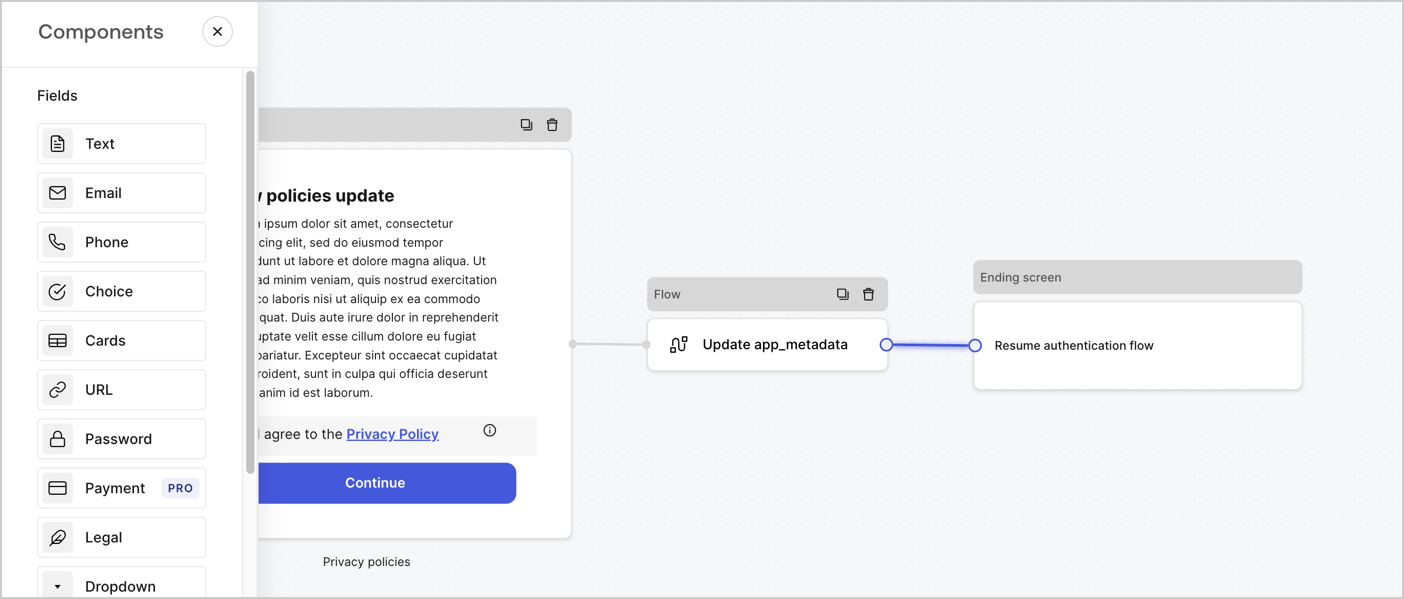
Add a **Flow** node after the **Step** node to update the `app_metadata` and resume the authentication flow by following these steps:

1. Select **Flow** from the bottom of the Form editor.
2. Remove the existing link between the **Step** and **Ending Screen** nodes.
3. Select the new **Flow** > **Click to add a flow** > **Create a new flow.**

   * Enter `Update app_metadata` in the **Name** field.
   * Select **Create**.
   * Select **Save**.
4. Link the **Flow** node to the **Step** and **Ending Screen** nodes as pictured below.
5. Select **Publish** to save.
<Frame>
  <img src="https://mintcdn.com/docs-dev-ia-user-profiles/XCPLNud4-wCwKwH9/docs/images/cdy7uua7fh8z/6YIkzm7SrpM9LW76AXuRzh/353c518fe82bbaa440836da1d83596d6/link-policies.png?fit=max&auto=format&n=XCPLNud4-wCwKwH9&q=85&s=69eb2c10b38df353332c1fd1944569e4" alt="Dashboard > Actions > Forms > Form" data-og-width="1404" width="1404" data-og-height="599" height="599" data-path="docs/images/cdy7uua7fh8z/6YIkzm7SrpM9LW76AXuRzh/353c518fe82bbaa440836da1d83596d6/link-policies.png" data-optimize="true" data-opv="3" srcset="https://mintcdn.com/docs-dev-ia-user-profiles/XCPLNud4-wCwKwH9/docs/images/cdy7uua7fh8z/6YIkzm7SrpM9LW76AXuRzh/353c518fe82bbaa440836da1d83596d6/link-policies.png?w=280&fit=max&auto=format&n=XCPLNud4-wCwKwH9&q=85&s=27fe64de368f5d740690fef8a5d954f7 280w, https://mintcdn.com/docs-dev-ia-user-profiles/XCPLNud4-wCwKwH9/docs/images/cdy7uua7fh8z/6YIkzm7SrpM9LW76AXuRzh/353c518fe82bbaa440836da1d83596d6/link-policies.png?w=560&fit=max&auto=format&n=XCPLNud4-wCwKwH9&q=85&s=615fb269074a3bf3267483814c2d35aa 560w, https://mintcdn.com/docs-dev-ia-user-profiles/XCPLNud4-wCwKwH9/docs/images/cdy7uua7fh8z/6YIkzm7SrpM9LW76AXuRzh/353c518fe82bbaa440836da1d83596d6/link-policies.png?w=840&fit=max&auto=format&n=XCPLNud4-wCwKwH9&q=85&s=0206a2523208cd93716be7c8a29e4d50 840w, https://mintcdn.com/docs-dev-ia-user-profiles/XCPLNud4-wCwKwH9/docs/images/cdy7uua7fh8z/6YIkzm7SrpM9LW76AXuRzh/353c518fe82bbaa440836da1d83596d6/link-policies.png?w=1100&fit=max&auto=format&n=XCPLNud4-wCwKwH9&q=85&s=10881a378af823c06bca786289d34d10 1100w, https://mintcdn.com/docs-dev-ia-user-profiles/XCPLNud4-wCwKwH9/docs/images/cdy7uua7fh8z/6YIkzm7SrpM9LW76AXuRzh/353c518fe82bbaa440836da1d83596d6/link-policies.png?w=1650&fit=max&auto=format&n=XCPLNud4-wCwKwH9&q=85&s=48ba34d87ff69177363d50727a219e5b 1650w, https://mintcdn.com/docs-dev-ia-user-profiles/XCPLNud4-wCwKwH9/docs/images/cdy7uua7fh8z/6YIkzm7SrpM9LW76AXuRzh/353c518fe82bbaa440836da1d83596d6/link-policies.png?w=2500&fit=max&auto=format&n=XCPLNud4-wCwKwH9&q=85&s=09a166c5c307b3af467d672db434aee1 2500w" />
</Frame>

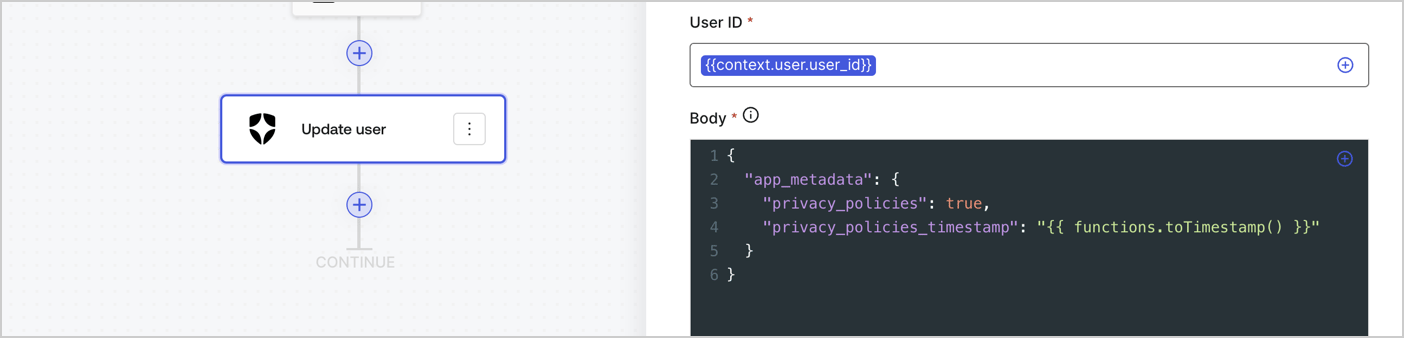
Add an Auth0 Update user action to the flow by following these steps:

1. Select the **Flow** **Update app\_metadata** > **Edit flow** to open the Flow editor in a new tab.
2. Below the StartAction, select the **+** icon to add an **Update user** action. Complete the fields below, then select **Save** to continue.

   * **Connection**: Select from the dropdown the Vault connection to your M2M application.

   * **User ID**: Enter `{{context.user.user_id}}`.

   * **Body**: Copy and paste the following code to update the app\_metadata with the privacy\_policies and privacy\_policies\_timestamp properties.

     ```text lines theme={null}
     {
       "app_metadata": {
         "privacy_policies": true,
         "privacy_policies_timestamp": "{{ functions.toTimestamp() }}"
       }
     }
     ```

   * Select **Save**.
3. Select **Publish** to save.
<Frame>
  <img src="https://mintcdn.com/docs-dev-ia-user-profiles/6u7qKB9g2v8C_9sP/docs/images/cdy7uua7fh8z/CvMNIwWrOUwaFW4X3G28p/1fb70ae57a20749d9ffaaba8dc0b7e26/update-user-privacy.png?fit=max&auto=format&n=6u7qKB9g2v8C_9sP&q=85&s=d44d2aa334384233032d999177982b51" alt="Dashboard > Actions > Forms > User case privacy policy code" data-og-width="1404" width="1404" data-og-height="338" height="338" data-path="docs/images/cdy7uua7fh8z/CvMNIwWrOUwaFW4X3G28p/1fb70ae57a20749d9ffaaba8dc0b7e26/update-user-privacy.png" data-optimize="true" data-opv="3" srcset="https://mintcdn.com/docs-dev-ia-user-profiles/6u7qKB9g2v8C_9sP/docs/images/cdy7uua7fh8z/CvMNIwWrOUwaFW4X3G28p/1fb70ae57a20749d9ffaaba8dc0b7e26/update-user-privacy.png?w=280&fit=max&auto=format&n=6u7qKB9g2v8C_9sP&q=85&s=8ba81fd3637bd2ffb15f92e6fdf983c2 280w, https://mintcdn.com/docs-dev-ia-user-profiles/6u7qKB9g2v8C_9sP/docs/images/cdy7uua7fh8z/CvMNIwWrOUwaFW4X3G28p/1fb70ae57a20749d9ffaaba8dc0b7e26/update-user-privacy.png?w=560&fit=max&auto=format&n=6u7qKB9g2v8C_9sP&q=85&s=e42612f7188fecde3c073a5a131be506 560w, https://mintcdn.com/docs-dev-ia-user-profiles/6u7qKB9g2v8C_9sP/docs/images/cdy7uua7fh8z/CvMNIwWrOUwaFW4X3G28p/1fb70ae57a20749d9ffaaba8dc0b7e26/update-user-privacy.png?w=840&fit=max&auto=format&n=6u7qKB9g2v8C_9sP&q=85&s=ece9de7ca108d565faeff5af2a05af1f 840w, https://mintcdn.com/docs-dev-ia-user-profiles/6u7qKB9g2v8C_9sP/docs/images/cdy7uua7fh8z/CvMNIwWrOUwaFW4X3G28p/1fb70ae57a20749d9ffaaba8dc0b7e26/update-user-privacy.png?w=1100&fit=max&auto=format&n=6u7qKB9g2v8C_9sP&q=85&s=3e7929de380789716003cd1ad8b79e8f 1100w, https://mintcdn.com/docs-dev-ia-user-profiles/6u7qKB9g2v8C_9sP/docs/images/cdy7uua7fh8z/CvMNIwWrOUwaFW4X3G28p/1fb70ae57a20749d9ffaaba8dc0b7e26/update-user-privacy.png?w=1650&fit=max&auto=format&n=6u7qKB9g2v8C_9sP&q=85&s=12fe8cbae4ff5fac712f8346ad9b4ced 1650w, https://mintcdn.com/docs-dev-ia-user-profiles/6u7qKB9g2v8C_9sP/docs/images/cdy7uua7fh8z/CvMNIwWrOUwaFW4X3G28p/1fb70ae57a20749d9ffaaba8dc0b7e26/update-user-privacy.png?w=2500&fit=max&auto=format&n=6u7qKB9g2v8C_9sP&q=85&s=b0e5eed5c2ac6aa185d44aa22c955fb6 2500w" />
</Frame>

<Callout icon="file-lines" color="#0EA5E9" iconType="regular">
  The flow **Update app\_metadata** adds a `privacy_policies true` value to the app`_metadata` object and also generates a timestamp with a [helper function.](/docs/customize/forms/variables)
</Callout>

## Retrieve the form render code

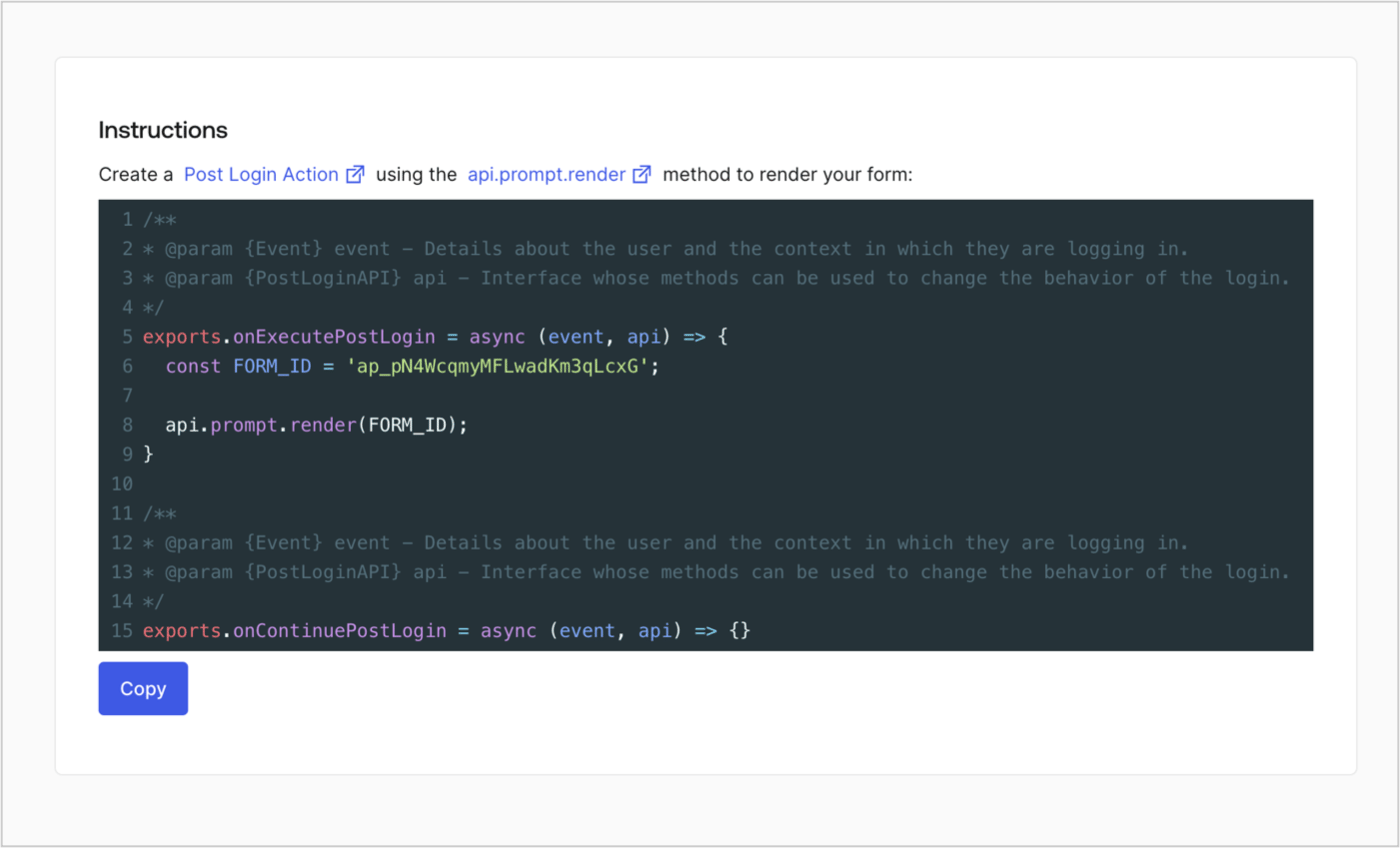
Retrieve your form render code to visually render the form with a custom Post Login Action by following these steps:

* From the Form editor, select **`<> Render`**.
* Select **Copy**.
<Frame>
  <img src="https://mintcdn.com/docs-dev-ia-user-profiles/OXluyo_6wmnupagB/docs/images/cdy7uua7fh8z/2EIUzc539sq9lwoTKbjoJv/496a864c0fc44a782c9cadca119dbfb0/embed.png?fit=max&auto=format&n=OXluyo_6wmnupagB&q=85&s=f418d1b747deea24fa51670064091d8c" alt="Dashboard > Actions > Forms > Form > Embed" data-og-width="1400" width="1400" data-og-height="848" height="848" data-path="docs/images/cdy7uua7fh8z/2EIUzc539sq9lwoTKbjoJv/496a864c0fc44a782c9cadca119dbfb0/embed.png" data-optimize="true" data-opv="3" srcset="https://mintcdn.com/docs-dev-ia-user-profiles/OXluyo_6wmnupagB/docs/images/cdy7uua7fh8z/2EIUzc539sq9lwoTKbjoJv/496a864c0fc44a782c9cadca119dbfb0/embed.png?w=280&fit=max&auto=format&n=OXluyo_6wmnupagB&q=85&s=d06f40bc4735b42463269b7bf8d8fde0 280w, https://mintcdn.com/docs-dev-ia-user-profiles/OXluyo_6wmnupagB/docs/images/cdy7uua7fh8z/2EIUzc539sq9lwoTKbjoJv/496a864c0fc44a782c9cadca119dbfb0/embed.png?w=560&fit=max&auto=format&n=OXluyo_6wmnupagB&q=85&s=358494d140cc6d7fd4a02d8172e810ec 560w, https://mintcdn.com/docs-dev-ia-user-profiles/OXluyo_6wmnupagB/docs/images/cdy7uua7fh8z/2EIUzc539sq9lwoTKbjoJv/496a864c0fc44a782c9cadca119dbfb0/embed.png?w=840&fit=max&auto=format&n=OXluyo_6wmnupagB&q=85&s=8dbb0cf6b0038d1fa36d9d3b54e51de0 840w, https://mintcdn.com/docs-dev-ia-user-profiles/OXluyo_6wmnupagB/docs/images/cdy7uua7fh8z/2EIUzc539sq9lwoTKbjoJv/496a864c0fc44a782c9cadca119dbfb0/embed.png?w=1100&fit=max&auto=format&n=OXluyo_6wmnupagB&q=85&s=df51a8c1f1dc4d29f7c9c51459f2c1f4 1100w, https://mintcdn.com/docs-dev-ia-user-profiles/OXluyo_6wmnupagB/docs/images/cdy7uua7fh8z/2EIUzc539sq9lwoTKbjoJv/496a864c0fc44a782c9cadca119dbfb0/embed.png?w=1650&fit=max&auto=format&n=OXluyo_6wmnupagB&q=85&s=da6c934d1267f0f5e47c06641b109041 1650w, https://mintcdn.com/docs-dev-ia-user-profiles/OXluyo_6wmnupagB/docs/images/cdy7uua7fh8z/2EIUzc539sq9lwoTKbjoJv/496a864c0fc44a782c9cadca119dbfb0/embed.png?w=2500&fit=max&auto=format&n=OXluyo_6wmnupagB&q=85&s=a019d0961852d867bd0d2b65c80aacd9 2500w" />
</Frame>

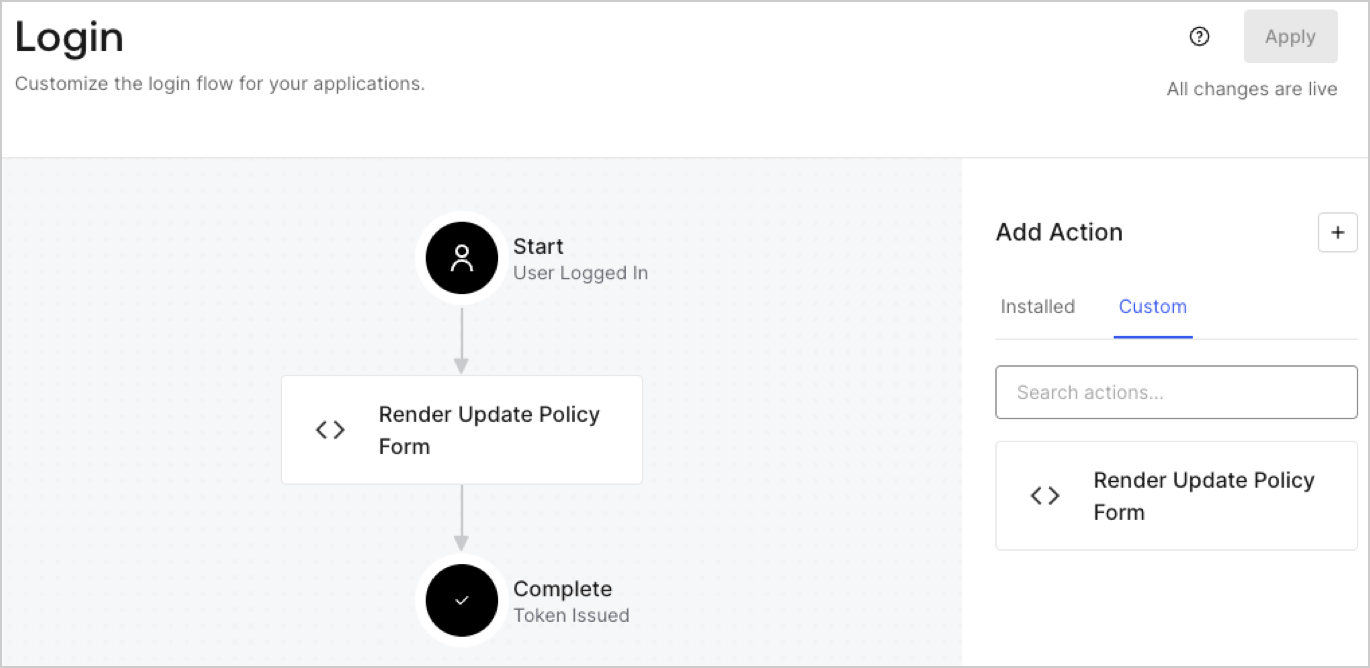
## Create a Post Login Action

Create a post-login Action to render your form by following these steps:

1. Navigate to **Auth0 Dashboard > Actions > Flows > Login.**
2. Select the **+** icon and Select **Build from scratch**:

   * **Name**: Enter `Render Update Policy Form`.
   * **Trigger**: Select `Login / Post Login`.
   * **Runtime**: Select the recommended version.
3. Select **Create**.

To configure the post-login Action:

1. Delete the existing code from the Code editor.
2. Paste the form render code into the Code editor.
3. Edit the code to define the conditional logic that will render the form.

   ```javascript lines theme={null}
   /**
   * @param {Event} event - Details about the user and the context in which they are logging in.
   * @param {PostLoginAPI} api - Interface whose methods can be used to change the behavior of the login.
   */
   exports.onExecutePostLogin = async (event, api) => {
     const FORM_ID = 'REPLACE_WITH_YOUR_FORM_ID';

     if (event.user.app_metadata.privacy_policies !== true) {
       api.prompt.render(FORM_ID);
     }
   }

   exports.onContinuePostLogin = async (event, api) => { }
   ```

   <Callout icon="file-lines" color="#0EA5E9" iconType="regular">
     The example code above will render the form when a user is missing the app metadata `privacy_policies` property.
   </Callout>
4. Select **Deploy.**
5. Drag and Drop the **Render Update Policy Form** Action to the **Login** flow.
   <Frame>
     <img src="https://mintcdn.com/docs-dev-ia-user-profiles/WhNkgNBu7I1tlYmh/docs/images/cdy7uua7fh8z/5TOwDgevZsBqd7yZynUYWU/41ca909dc3007aed4f40ff794a05efa5/postlogin.png?fit=max&auto=format&n=WhNkgNBu7I1tlYmh&q=85&s=698f7c1510bd761a60ceccceabb81bf2" alt="Dashboard > Forms > Use Case > Render update policy form login action" data-og-width="1370" width="1370" data-og-height="668" height="668" data-path="docs/images/cdy7uua7fh8z/5TOwDgevZsBqd7yZynUYWU/41ca909dc3007aed4f40ff794a05efa5/postlogin.png" data-optimize="true" data-opv="3" srcset="https://mintcdn.com/docs-dev-ia-user-profiles/WhNkgNBu7I1tlYmh/docs/images/cdy7uua7fh8z/5TOwDgevZsBqd7yZynUYWU/41ca909dc3007aed4f40ff794a05efa5/postlogin.png?w=280&fit=max&auto=format&n=WhNkgNBu7I1tlYmh&q=85&s=220a7a2647753f409154dd8b6ccfeb7d 280w, https://mintcdn.com/docs-dev-ia-user-profiles/WhNkgNBu7I1tlYmh/docs/images/cdy7uua7fh8z/5TOwDgevZsBqd7yZynUYWU/41ca909dc3007aed4f40ff794a05efa5/postlogin.png?w=560&fit=max&auto=format&n=WhNkgNBu7I1tlYmh&q=85&s=be16138e769b99f3ff00512608f6b8e0 560w, https://mintcdn.com/docs-dev-ia-user-profiles/WhNkgNBu7I1tlYmh/docs/images/cdy7uua7fh8z/5TOwDgevZsBqd7yZynUYWU/41ca909dc3007aed4f40ff794a05efa5/postlogin.png?w=840&fit=max&auto=format&n=WhNkgNBu7I1tlYmh&q=85&s=2c05131669c4efe0181282f01357fbd3 840w, https://mintcdn.com/docs-dev-ia-user-profiles/WhNkgNBu7I1tlYmh/docs/images/cdy7uua7fh8z/5TOwDgevZsBqd7yZynUYWU/41ca909dc3007aed4f40ff794a05efa5/postlogin.png?w=1100&fit=max&auto=format&n=WhNkgNBu7I1tlYmh&q=85&s=78b666e587a24489630a6c622e5554fc 1100w, https://mintcdn.com/docs-dev-ia-user-profiles/WhNkgNBu7I1tlYmh/docs/images/cdy7uua7fh8z/5TOwDgevZsBqd7yZynUYWU/41ca909dc3007aed4f40ff794a05efa5/postlogin.png?w=1650&fit=max&auto=format&n=WhNkgNBu7I1tlYmh&q=85&s=2ed8a0e02463dd76b83a6c1b5a24a9ba 1650w, https://mintcdn.com/docs-dev-ia-user-profiles/WhNkgNBu7I1tlYmh/docs/images/cdy7uua7fh8z/5TOwDgevZsBqd7yZynUYWU/41ca909dc3007aed4f40ff794a05efa5/postlogin.png?w=2500&fit=max&auto=format&n=WhNkgNBu7I1tlYmh&q=85&s=1c6802a6dc7d0535714d23ea9ec887ab 2500w" />
   </Frame>
6. Select **Apply.**

### Test implementation

Test the implementation by following these steps:

1. Log in with an existing user whose app`_metadata` attribute `privacy_policies` does not have a value.
2. The post-login Action in the Login flow will render the form and prompt for acceptance.
3. Select **Auth0 Dashboard > User Management > Users,** locate the user and verify that the `app_metadata` attribute `privacy_policies` contains a `true` value and a timestamp.
